STW Services

Let’s Talk
On-premises to Dynamics 365 online

Dynamics CRM On-Premises to Dynamics 365 Cloud Migration Services

Move your on-premises Dynamics CRM to Dynamics 365 online without losing data, customizations or integrations.

STW Services assesses your Dynamics CRM or Dynamics 365 (on-premises) deployment, fixes what would block a migration, prepares the cloud environment and moves your organisation to Dynamics 365 online through the right route: Microsoft’s supported on-premises-to-online pathway where eligible, or an upgrade or clean data migration where it is not.

  • Dynamics CRM & Dynamics 365 on-premises
  • Plug-ins, workflows & integrations
  • Pune, India · since 2011
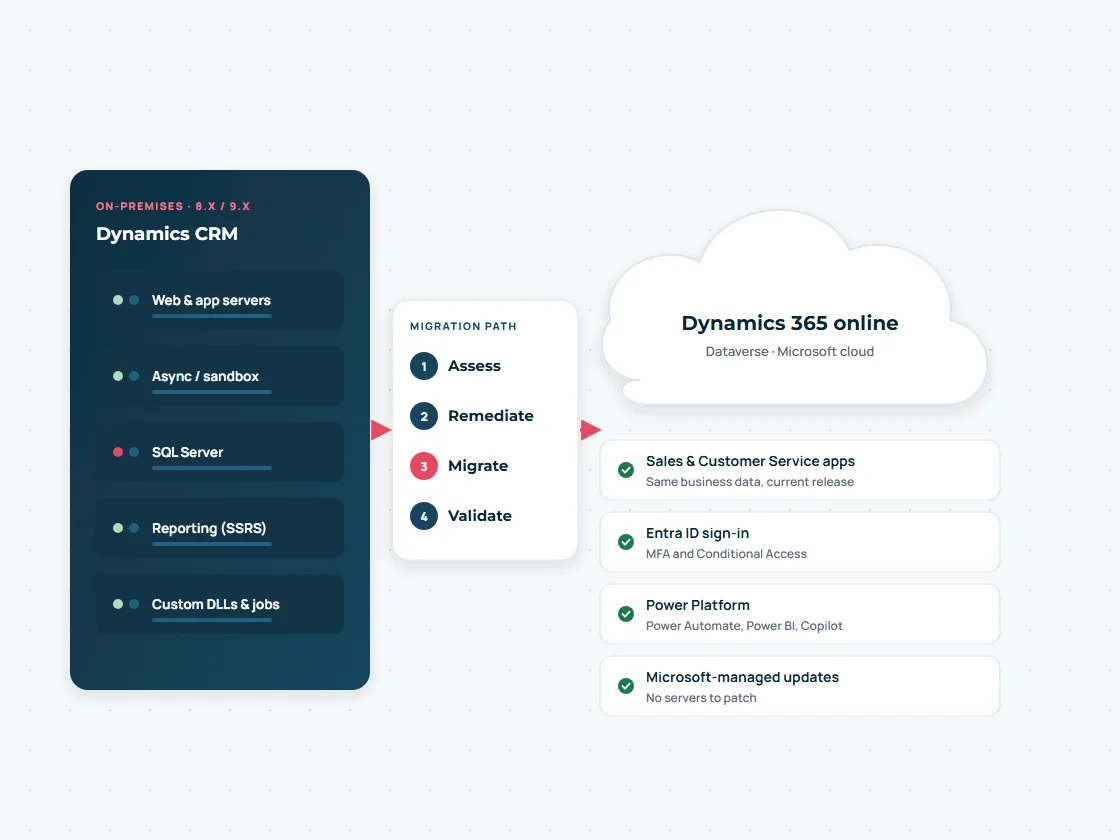
Illustration of on-premises Dynamics CRM servers moving through assess, remediate, migrate and validate steps to Dynamics 365 online in the Microsoft cloud
Illustration: on-premises Dynamics CRM moving to Dynamics 365 online.
Why move

Why organisations move on-premises Dynamics CRM to the cloud

Moving to Dynamics 365 online removes servers to run and patch, puts you on Microsoft’s current release, and unlocks cloud features such as Power Platform, Copilot and Entra ID security that on-premises versions do not get.

On-premises CRM needs Windows and SQL servers, upgrades, backups and specialist skills. Many older versions are out of support: version 9.0 stopped receiving updates on 12 July 2023, and older 8.x and earlier releases are also past end of support. Version 9.1 is supported until 2029 for mainstream support, but it will not receive the online features released every wave.

Version 9.0Support ended 12 July 2023, no security updates
Version 9.1Mainstream support to 13 January 2029, extended to 10 January 2031
Dynamics 365 onlineContinuous updates, new features each release wave

Dates from Microsoft’s lifecycle page, checked November 2026.

Security & identity

Entra ID sign-in, MFA, Conditional Access and Microsoft-managed infrastructure.

Power Platform & Copilot

Power Automate, Power BI, Copilot Studio agents and Copilot in Dynamics 365.

No servers to run

No SQL, IIS or CRM server patching, upgrades or hardware refreshes.

Work from anywhere

Mobile apps, Outlook and Teams integration without VPN or ADFS.

Readiness

Version assessment and migration eligibility

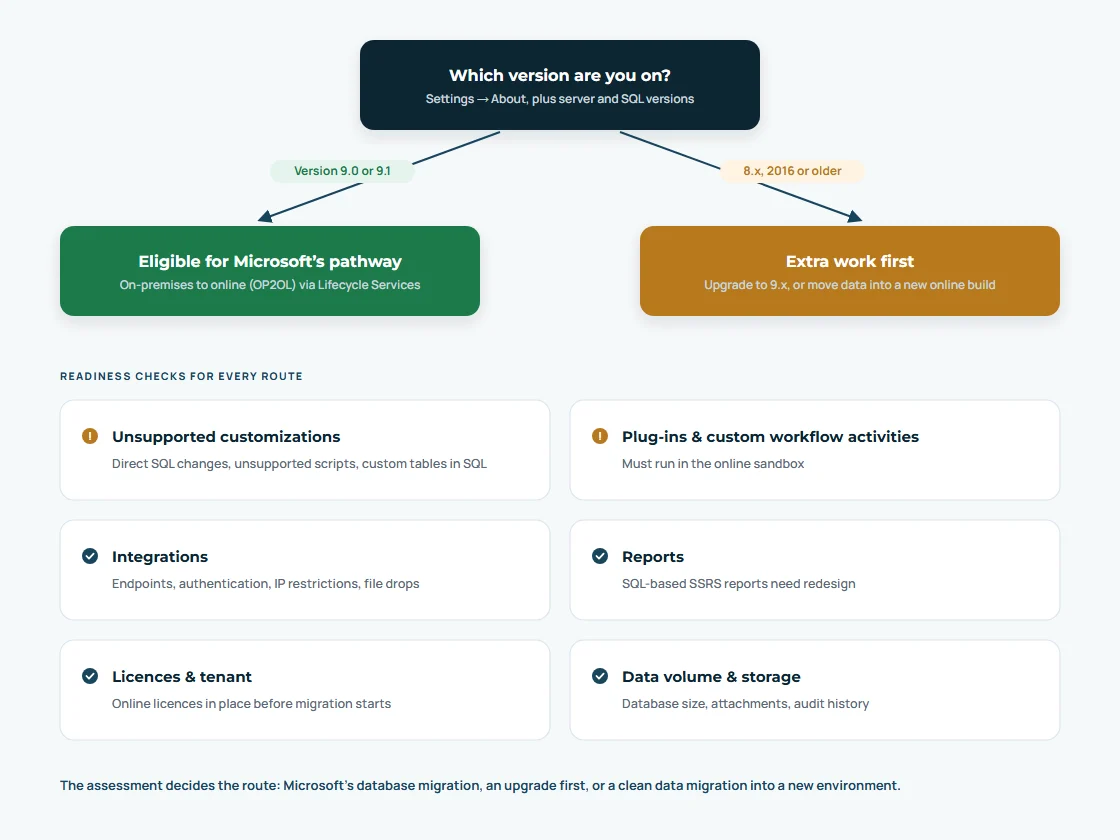
Microsoft’s documented on-premises-to-online migration pathway supports Dynamics CRM or Dynamics 365 (on-premises) version 9.0 or later. Older versions need an upgrade or a different migration route first.

The first step is establishing exactly what you run: CRM version and update level, SQL Server version, deployment topology, solutions and their publishers, plug-ins, custom workflow activities, reports, integrations and database size.

Your versionTypical route
Dynamics 365 9.0 or 9.1 (on-premises)Eligible for Microsoft’s on-premises-to-online (OP2OL) migration, run through Dynamics Lifecycle Services, after remediation
Dynamics CRM 2016 / Dynamics 365 8.xUpgrade to 9.x on-premises first, or move data and solutions into a new online environment
Dynamics CRM 2015 and earlierMulti-step upgrade, or a clean rebuild online with data migration, decided in the assessment
Migration readiness decision diagram: versions 9.0 and 9.1 can use Microsoft’s on-premises to online pathway, older versions need extra work first, plus readiness checks
How the assessment decides the migration route.
Pathways

Microsoft-supported migration pathways

There is no single button that moves every on-premises deployment. We choose the route that fits your version, customizations and data.

Microsoft OP2OL database migration

For version 9.0 or later. Microsoft’s migration tooling, orchestrated through Dynamics Lifecycle Services, moves the organisation database to Dynamics 365 online. Online licences must be in place first, and unsupported customizations or SQL-level changes must be fixed before the migration can run.

Upgrade, then migrate

For 8.x and some older deployments. The on-premises organisation is upgraded to a supported 9.x version, remediated and then migrated with the Microsoft pathway.

Rebuild online and migrate data

For very old or heavily customised systems, or when you want a clean start. Solutions are rebuilt or re-imported in a new online environment and data is moved through a staging database with full reconciliation.

Microsoft’s pathway and its requirements are described in its on-premises-to-online migration guidance and whitepaper. Eligibility and the final route are confirmed in your assessment; we do not assume every deployment can migrate automatically.

Current vs future state

Infrastructure and dependency assessment

Everything that touches the on-premises servers needs a cloud equivalent: identity, reports, integrations, email and custom code.
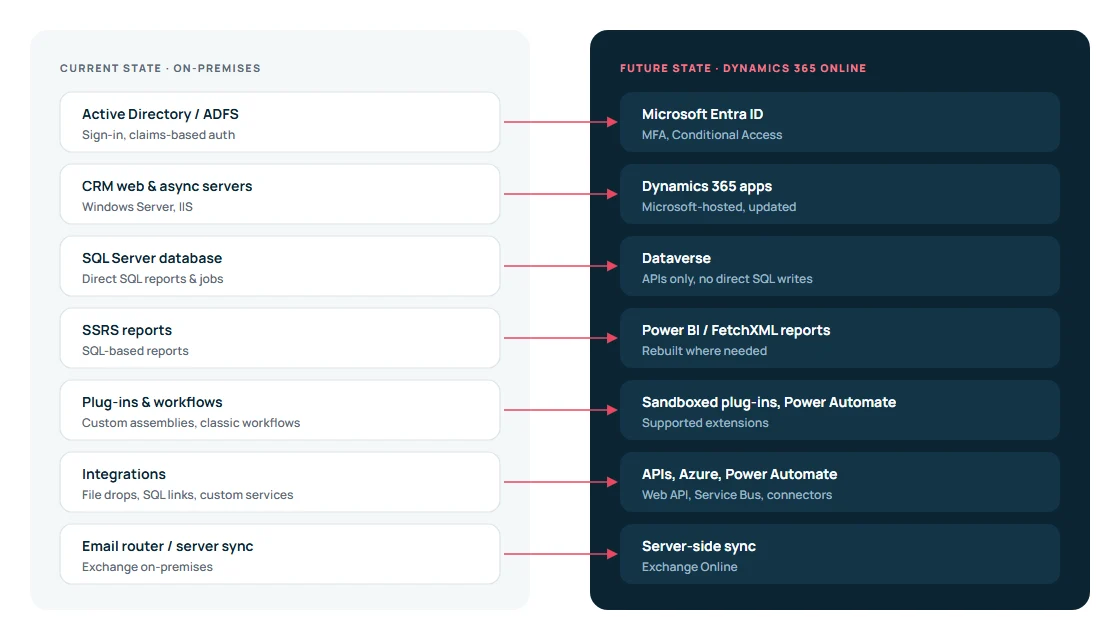
Current-state on-premises Dynamics CRM architecture compared with the future-state Dynamics 365 online architecture
What changes between the on-premises and online architecture.
Custom code & integrations

Plug-ins, workflows, integrations and unsupported customizations

Customizations are where on-premises migrations succeed or fail. We inventory every solution, assembly and process and test it against online rules.

ItemWhat we checkTypical remediation
Plug-ins & custom workflow activitiesMust run in the online sandbox with no file system or local resource accessRefactor, or move logic to Power Automate or Azure Functions
Direct SQL changesTriggers, views, stored procedures or data written straight to SQLRemove; re-implement with supported APIs before migration
Client scripts & web resourcesDeprecated client APIs, unsupported DOM accessUpdate to the current client API
SSRS reportsSQL-based reports cannot run onlineRebuild as FetchXML reports or Power BI
IntegrationsEndpoints, authentication, network rules, file dropsDataverse Web API, application users, Azure Service Bus or Power Automate
EmailEmail router or server-side sync to Exchange on-premisesServer-side synchronisation with Exchange Online
Classic workflows & dialogsDeprecated featuresMigrate to Power Automate cloud flows

Not the same as NAV to Business Central

This page covers Dynamics CRM / Dynamics 365 Customer Engagement on-premises. Moving Dynamics NAV to Business Central is a separate ERP process; see our NAV to Business Central migration service.

Remediation is required, not optional

Microsoft’s pathway requires the customer or partner to fix unsupported customizations or SQL Server-level changes that would block the database migration. We plan and do this work before migration day.

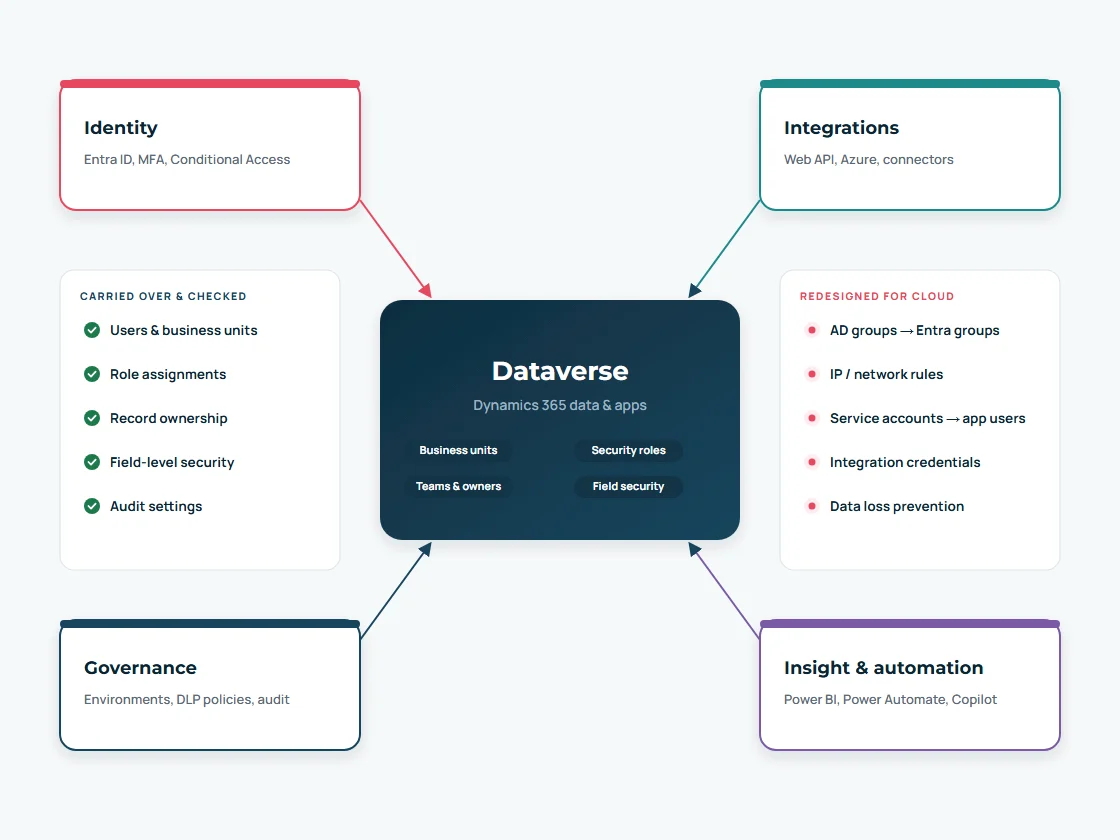
Security, integration and governance architecture around Dataverse after moving Dynamics CRM to the cloud
Security, integration and governance around Dataverse after the move.
Security & governance

Security, permissions and data governance

Users, business units, security roles, teams, field security and record ownership come across with the database or are recreated for a rebuild, and are verified role by role. Identity moves from Active Directory and ADFS to Microsoft Entra ID, with MFA and Conditional Access.

  • Entra ID users and groups mapped to Dynamics 365 users and teams
  • Service accounts replaced by application users with least privilege
  • Environment strategy: production, test and development
  • Data loss prevention policies for Power Platform connectors
  • Auditing switched on for the tables that need it
Migration delivery

Technical migration stages

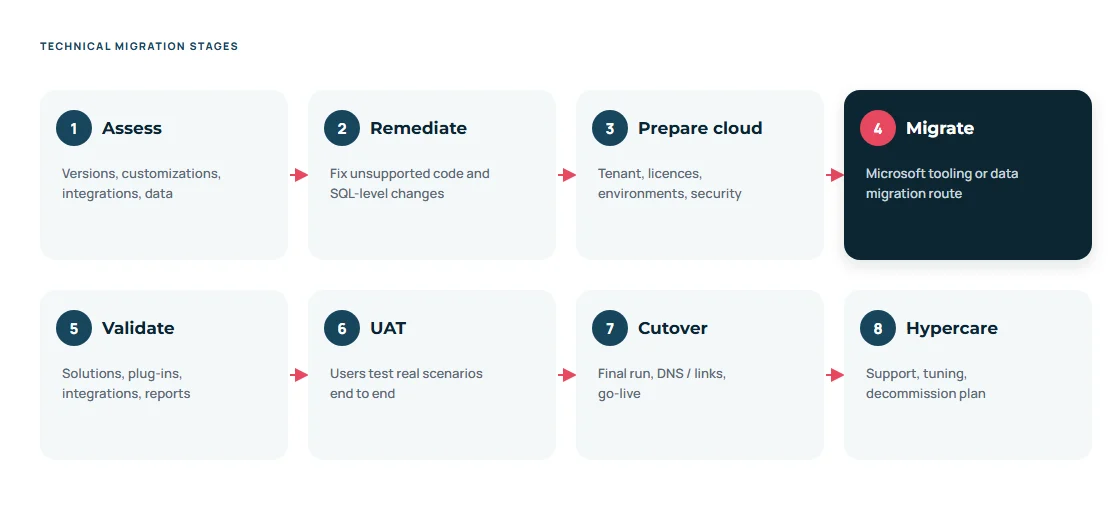
Eight technical stages of an on-premises to Dynamics 365 online migration from assessment to hypercare
Eight stages from assessment to hypercare.

Data migration and reconciliation

Whatever the route, we compare record counts per table, key totals and samples between on-premises and online, and test attachments and notes.

Cloud environment preparation

Tenant, licences, Dynamics 365 environments, storage capacity, region, release settings and administrative access set up before migration.

Integration and customization validation

Every solution, plug-in, flow, report and integration is tested online against agreed test cases.

Cutover strategy

Freeze window, final migration, URL and link changes, integration switch-over, go or no-go checks and a fallback plan.

User acceptance testing

Business users run their real scenarios on migrated data and sign off before go-live.

Training and post-migration support

User and admin training on the online experience, hypercare, then optional ongoing Dynamics 365 support and a server decommissioning plan.

Still running Dynamics CRM on your own servers?

Start with a readiness assessment: version, customizations, integrations and the right migration route.

Talk to a Dynamics 365 Consultant
Why STW Services

A Dynamics CRM team for your move to the cloud

A Microsoft business applications team in Pune, India, delivering for clients worldwide since 2011.

Dynamics 365 & Dataverse delivery

Dynamics 365 Sales implementations, customisation, plug-ins and integrations

Migration discipline

Staging, mapping documents, trial runs and reconciliation, not one-shot imports

Joined-up Microsoft stack

Business Central, Power Automate, Power BI, SharePoint and Copilot Studio in one team

Honest scoping

We tell you what will move, what will be rebuilt and what should be archived

FAQ

On-premises migration questions

Clear answers on versions, pathways, customizations and downtime.

Ask us a question
Can every on-premises Dynamics CRM deployment move to Dynamics 365 online?

Most can, but not automatically. Microsoft’s documented on-premises-to-online pathway supports version 9.0 or later, requires online licences first and requires unsupported customizations to be fixed. Older versions need an upgrade or a rebuild with data migration.

Which versions are eligible for Microsoft’s migration pathway?

Dynamics CRM or Dynamics 365 (on-premises) version 9.0 or later, on a SQL Server version supported by that release. The migration is orchestrated through Dynamics Lifecycle Services.

We are on Dynamics CRM 2016. What are our options?

CRM 2016 is version 8.x. You can upgrade to 9.x on-premises and then use Microsoft’s pathway, or set up a new online environment and migrate solutions and data. The assessment compares cost, risk and downtime for both.

Will our plug-ins and custom workflows work online?

Many will, after review. Plug-ins must run in the online sandbox and cannot use local files or direct database access. Classic workflows still run but are deprecated, so we usually move them to Power Automate.

What happens to our SSRS reports?

SQL-based SSRS reports cannot run online. They are rebuilt as FetchXML reports or, more often, Power BI reports on Dataverse.

How long will we be offline during migration?

Downtime depends on database size and the route. Trial migrations measure it, and the cutover plan schedules the freeze for a quiet period such as a weekend.

Do we need to buy Dynamics 365 online licences first?

Yes. Microsoft requires online licences to be procured before its migration process starts. We help you map current users and roles to the right licence types.

Is this the same as moving Dynamics NAV to Business Central?

No. NAV is an ERP and moves to Business Central through a separate upgrade or migration process. This service covers Dynamics CRM and Dynamics 365 Customer Engagement.

Choose your migration

Moving from a different CRM?

Next step

Get help moving Dynamics CRM to the cloud

Tell us your CRM version, number of users and the main customizations and integrations. We will reply with the likely route and next steps.

  • A reply from a Dynamics 365 consultant
  • Practical next steps and the questions to answer first
  • No obligation

Get Migration Assistance

Tell us which CRM or version you run today, roughly how much data you have and what Dynamics 365 should do on day one. A Dynamics 365 consultant will reply with practical next steps.

  • Describe your current CRM or Dynamics CRM version in the form
  • Mention users, record volumes and key integrations
  • Or email support@stw-services.com
Get Migration Assistance