These pages open STW Automation, our Microsoft 365 team’s site, in a new tab.
SharePoint Intranet & Portals SharePoint Document Management & Collaboration Microsoft Teams Apps & Extensions SharePoint & Teams Integration Microsoft 365 Setup & Consulting SharePoint Support & MaintenanceMicrosoft Power Platform
Power Apps & Power Platform ↗ Power Automate ↗ Power BI & Analytics ↗ Copilot Studio & AI AgentsAI & business automation
Generative AI: STW.AI SQL Assistant RPA & Process Automation ↗ Intelligent Workflow Automation ↗ Customer Service Automation ↗Bring customers, pipeline and history from any CRM into Dynamics 365, clean, connected and reconciled.
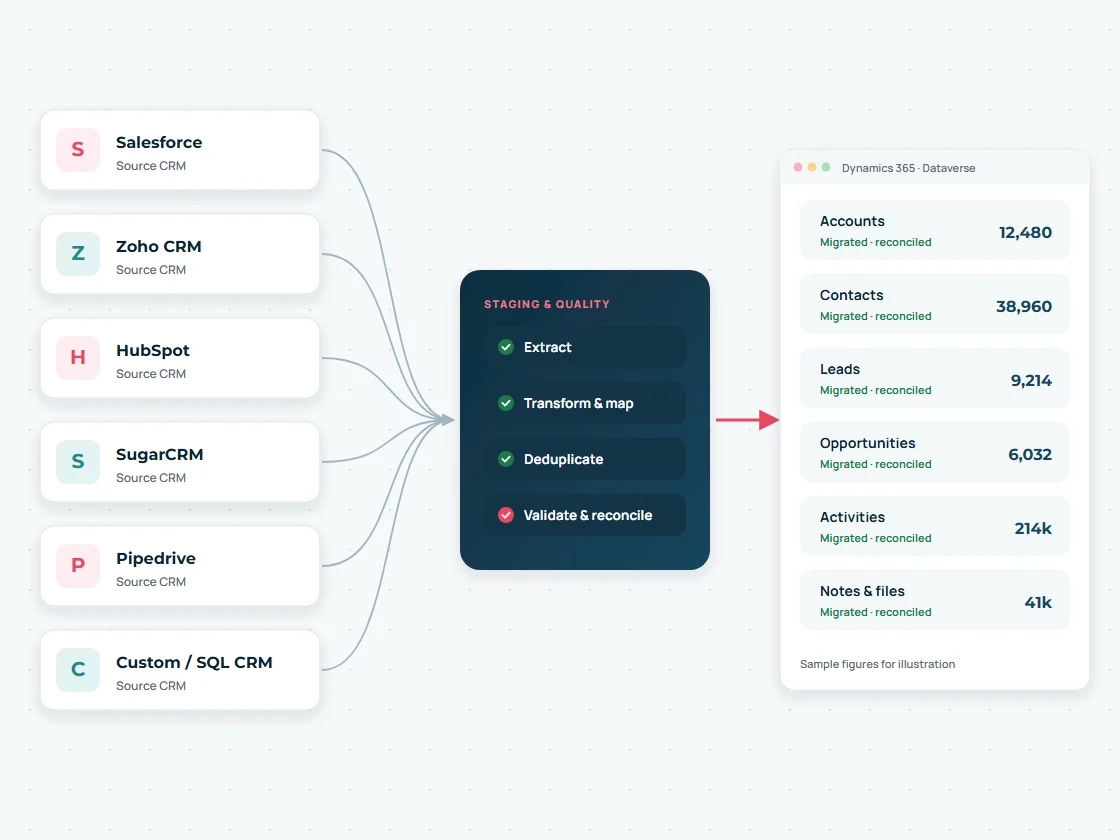
STW Services plans and runs CRM migrations into Dynamics 365 and Microsoft Dataverse from third-party and legacy platforms such as Salesforce, Zoho CRM, HubSpot, SugarCRM, Pipedrive and custom SQL-based CRMs. We assess the source, design the target data model, transform and de-duplicate the data in a staging layer, and prove the result with trial migrations and reconciliation.

Every CRM stores customers, deals and activities differently. The migration method stays the same; the extraction and mapping change.
Accounts, contacts, leads, opportunities, cases, custom objects, files and activity history. Record types and sharing rules need mapping to Dynamics 365 security.
Accounts, contacts, leads, deals, activities and custom modules. Layouts and picklists are mapped to forms and choice columns.
Companies, contacts, deals, tickets, engagements and associations. Many-to-many associations need a clear target design.
Accounts, contacts, opportunities, cases and custom modules, often from a SQL database we can read directly.
Organizations, people, leads, deals and activities. See our dedicated Pipedrive to Dynamics 365 migration page.
In-house databases, Access or spreadsheets used as a CRM. We work from the database schema or exports.
Platform names are examples of sources we can work with. The approach for your system is confirmed in the assessment, after we review your data, access and integrations.
A CRM migration assessment tells you what data you have, what is worth moving, how it maps to Dynamics 365 and what could go wrong, before you commit to a timeline.
We analyse the source CRM table by table: record counts, how often each field is actually filled in, picklist values, relationships, attachments and integrations that write into it. In long-running CRMs it is common to find many fields that are rarely used and tables that no longer matter, which shrinks the migration and the cost.
An assessment report with the data inventory, a draft mapping, the recommended tooling, an archive strategy for old data and a plan with clear decisions for your team.
We also compare Dynamics 365 Sales Professional, Sales Enterprise and Customer Service against your requirements as part of the assessment, alongside our Dynamics 365 consulting services.
Following Microsoft’s guidance for complex migrations, data moves through a staging database rather than straight from one CRM into another.
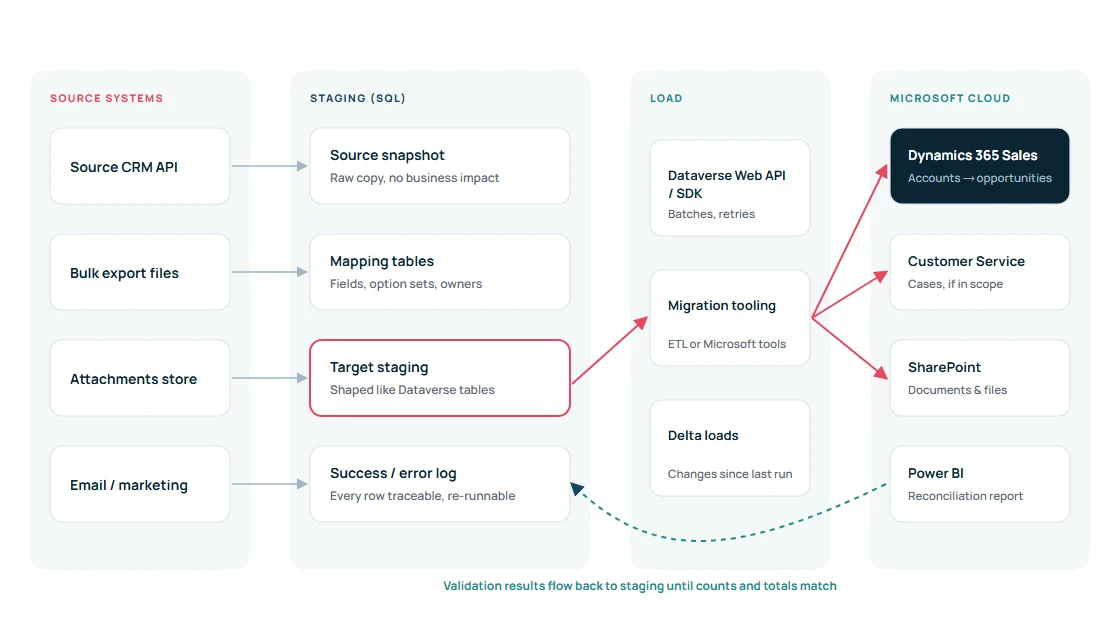
Data is pulled through the source CRM’s API or bulk export into a source snapshot. The live CRM is not affected and your team keeps working.
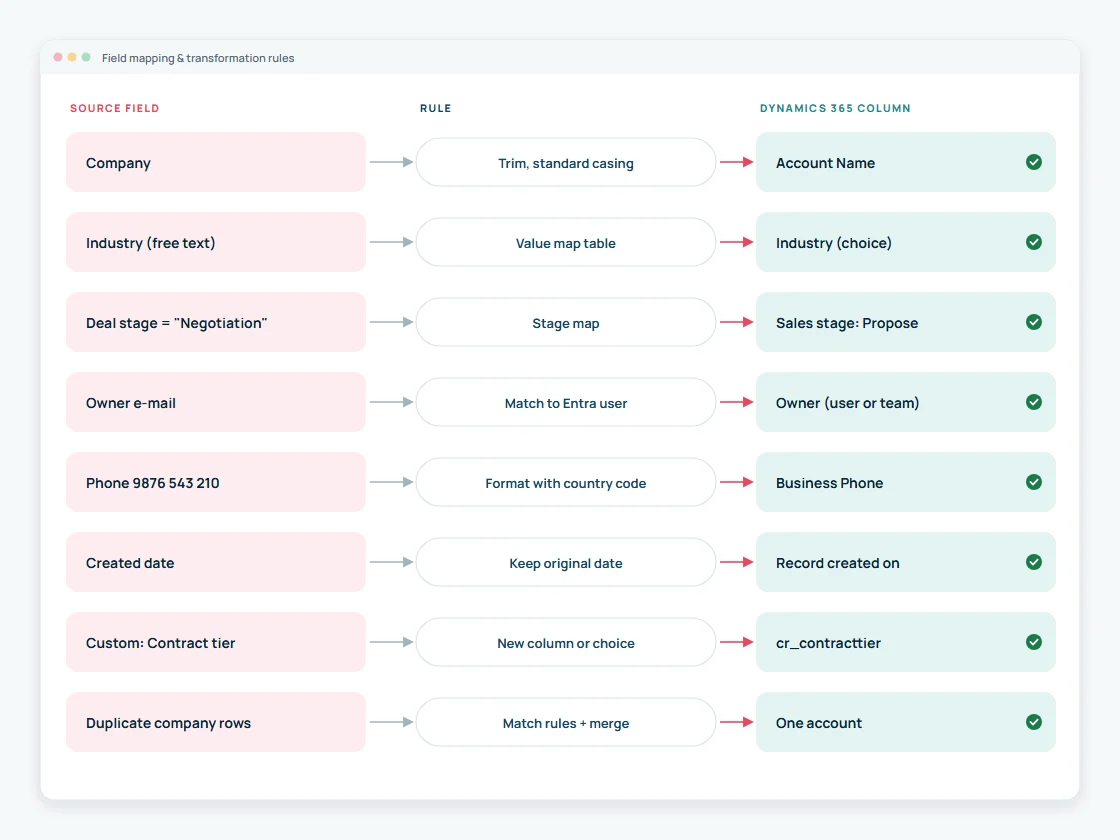
A target staging area shaped like the Dataverse tables holds mapped, cleaned values: option sets translated, strings trimmed, owners resolved.
Data is loaded in dependency order through the Dataverse API or proven migration tooling, in tuned batches with retries, and every row is logged as success or error.
| Data | Dynamics 365 / Dataverse target | Notes |
|---|---|---|
| Accounts and contacts | Accounts, contacts, parent account hierarchy | Addresses and phones standardised; duplicates merged |
| Leads | Leads with source and status | Disqualified leads can be archived instead |
| Opportunities / deals | Opportunities, opportunity products, quotes if needed | Closed opportunities are set to won or lost at the end of the load |
| Activities | Emails, phone calls, appointments, tasks | Linked to the right record; history depth agreed |
| Notes and attachments | Notes, file columns or SharePoint | Large file volumes usually go to SharePoint or Azure storage |
| Cases and service data | Dynamics 365 Customer Service cases | Only when service is in scope |
| Custom objects | Custom tables and relationships | Designed in a Dataverse solution before loading |
| Users, teams, ownership | Users, teams, business units | Owner set at creation, because it drives security |
Created dates can be preserved so reports and ageing stay meaningful, and records are owned by the right user or team from the start. Change history from the old CRM normally stays in an archive rather than the new audit log.
The mapping document is the contract of the migration: every source field, its rule and its target column. Transformations happen in staging, so they can be tested and repeated.

Dynamics 365 security is based on business units, security roles, teams and record ownership. Source CRM concepts such as Salesforce sharing rules, HubSpot teams or Zoho roles do not translate one to one, so we design the target model first and migrate into it.
Custom objects become custom Dataverse tables inside a managed solution, with proper relationships, choice columns and forms. We avoid recreating clutter from the old system and keep the model maintainable for Power Automate, Power BI and future integrations.
Depending on volume and complexity we use the Dataverse Web API or SDK, Azure Data Factory, the Configuration Migration tool, established third-party migration tools or a combination. Small, simple datasets can use Dynamics 365’s built-in Excel and CSV import.
Business units, roles and teams designed before data loads.
Users and stub users created first so every record has the right owner.
Custom tables, relationships and alternate keys for repeatable loads.
Systems that wrote to the old CRM are re-pointed to Dataverse APIs.

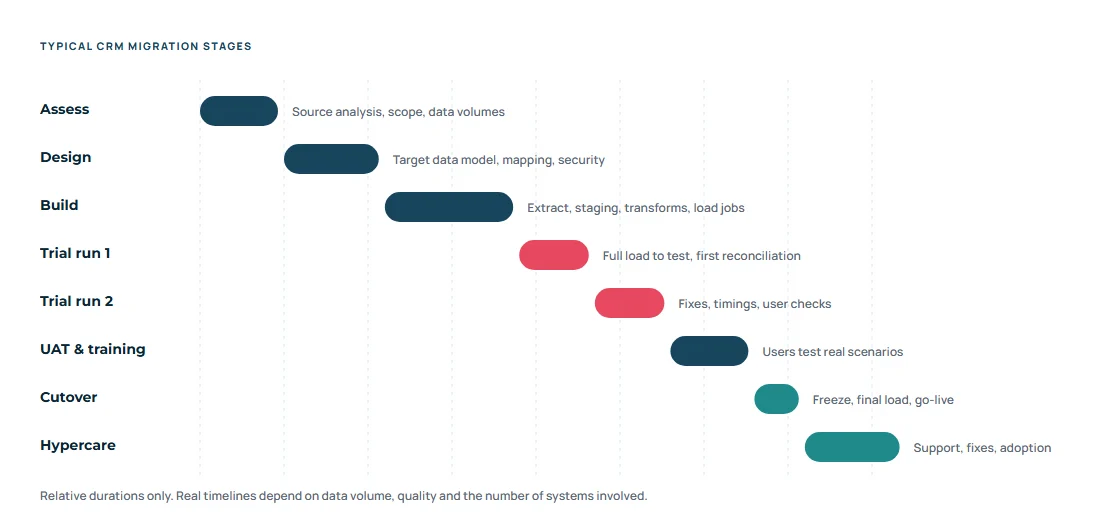
Source analysis, target data model, mapping and security design.
Extraction, staging, transformations and load jobs with logging.
At least two full trial runs into a test environment, timed and reconciled.
Your users test real scenarios on migrated data and learn the new system.
Freeze the old CRM, final delta load, checks and go-live.
Close support after go-live, fixes and adoption tracking.
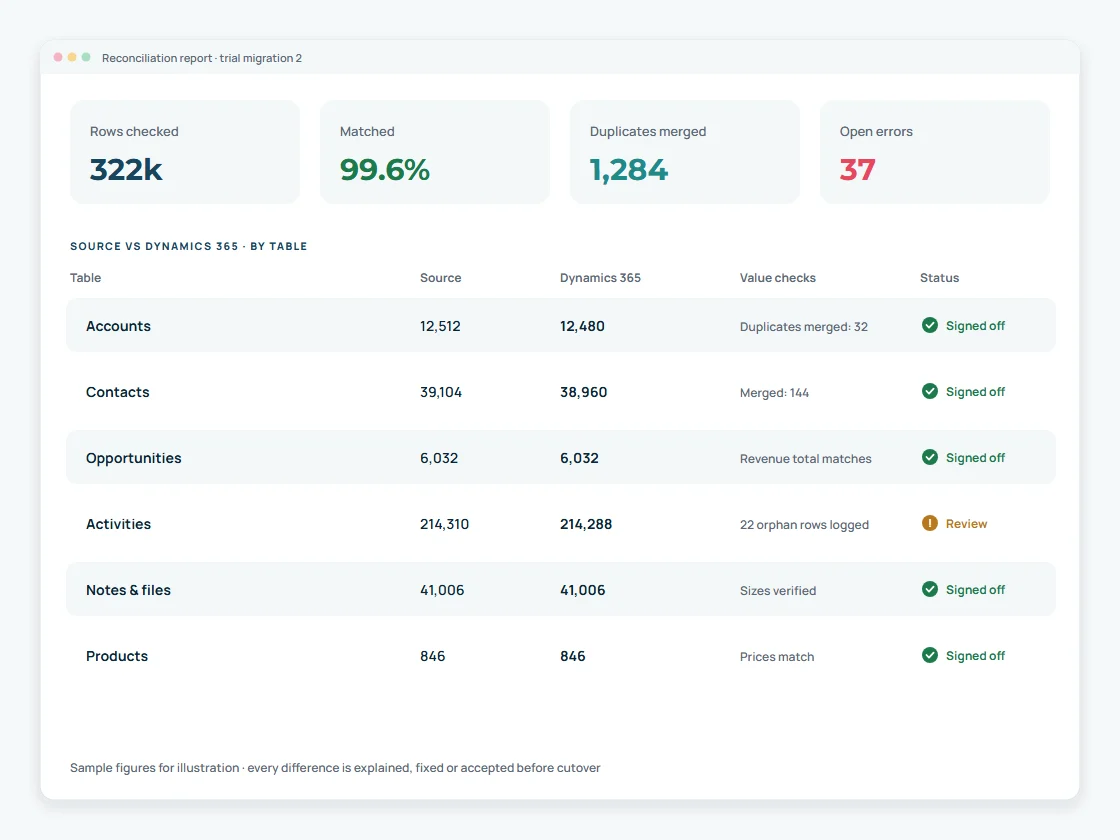
Each trial run ends with a reconciliation report: record counts per table, financial totals such as pipeline value, orphaned records, error rows and a sample of records checked by your users. Differences are explained, fixed or formally accepted before cutover is scheduled.
The cutover plan sets the freeze window, the order of final loads, who checks what, the go or no-go decision and the fallback. Trial runs tell us how long each step takes, so the downtime is predictable.
Role-based training, quick guides and early hypercare make sure people actually use the new system. We track open issues and usage in the first weeks.
A short assessment gives you the data inventory, risks and a realistic plan before you commit.
A Microsoft business applications team in Pune, India, delivering for clients worldwide since 2011.
Dynamics 365 Sales implementations, customisation, plug-ins and integrations
Staging, mapping documents, trial runs and reconciliation, not one-shot imports
Business Central, Power Automate, Power BI, SharePoint and Copilot Studio in one team
We tell you what will move, what will be rebuilt and what should be archived
Straight answers before you plan your move to Dynamics 365.
Ask us a question →For anything beyond a small dataset, use a staging database: extract from the old CRM, transform and clean the data into a structure that mirrors Dataverse, load in dependency order through the Dataverse API or a proven tool, and reconcile after each trial run. This is the approach Microsoft describes for complex migrations.
Any CRM that offers an API, export or database access, including Salesforce, Zoho CRM, HubSpot, SugarCRM, Pipedrive and custom systems. The effort depends on data volume, customisation and data quality rather than the brand.
Usually yes, linked to the right accounts, contacts and opportunities. Large email and file histories are often partly archived to keep the new system fast and storage costs reasonable. We agree the cut-off with you.
Duplicates are identified and merged in staging using agreed match rules, and duplicate detection rules are configured in Dynamics 365 so new duplicates are caught after go-live.
Owners are mapped to Dynamics 365 users or teams and set when each record is created. Security is redesigned with business units, roles and teams, because source sharing models do not translate directly.
Normally only a short freeze at cutover. Trial runs measure the time each load takes, and a final delta load moves only the changes made since the last full run.
They need to be re-pointed to Dynamics 365. We list every integration during the assessment and plan its replacement, often using the Dataverse Web API, Power Automate or Azure services. See our integration and automation services.
No. CRM migration moves customer engagement data into Dynamics 365 Sales or Customer Service. NAV to Business Central is an ERP upgrade or migration and is covered on our NAV to Business Central migration page.
Specialist route for Pipedrive deals, people, organizations and activities.
See this service →Salesforce, Zoho CRM, HubSpot, SugarCRM, custom and legacy CRMs.
Dynamics CRM or Dynamics 365 on-premises to Dynamics 365 online.
See this service →Consulting, implementation and support across Dynamics 365.
Explore →Sales and customer engagement on Dynamics 365.
Explore →Connect CRM with ERP through Dataverse.
Explore →Put AI agents on top of your migrated CRM data.
Explore →Tell us which CRM you use, how many users and roughly how much data. We will reply with the questions that matter and a practical next step.
Tell us which CRM or version you run today, roughly how much data you have and what Dynamics 365 should do on day one. A Dynamics 365 consultant will reply with practical next steps.