1. Install magento 2. 2. Go to admin panel and login. 3. Now you may see this window ( links not working )
4. To solve the issue, open your xampp shell
5. Specify your path
6. Run following command from Magento root: php bin/magento setup:static-content:deploy
7. Go to admin panel and check if the issue has fixed. You can see the admin panel like this.
8. Now you can start with creating your custom theme. 9. At first, create your folder in C:\xampp\htdocs\Magento2_new\app\design\frontend\ and create your folder within
10. Add or copy from an existing theme.xml to your theme directory app/design/frontend/
11. Add a composer.json file to the theme directory and register the package on a packaging server.
12. To register your theme in the system, in your theme directory add a registration.php file with the following content:
13. Copy a media folder from an existing theme to your theme directory. 14. Create directories for static files. Your theme will likely contain several types of static files: styles, fonts, JavaScript and images. Each type should be stored in a separate sub-directory of web in your theme folder:
15. At this point your theme file structure looks as follows:
16. Your theme is created now. Login to admin panel and go to Stores -> Configuration -> Design, you can see your theme. Select your theme and save it.
17. Run the following commands for static content deployment and database update from your root directory php bin/magento setup:static-content:deploy php bin/magento setup:upgrade 18. You can customize your site now, using your own theme.
Install Magento 2 – beginner’s guide – Before continuing, make sure you have all the prerequisites, required for running Magento 2, below are system requirements
System requirements: 1. Apache Version: 2.2 or 2.4 2. PHP version: 5.5.x, where x is 22 or greater 3. MySQL Version : 5.6.x and upper
Installation 1. First and easiest way is to download the Magento installation package from official Magento site https://www.magentocommerce.com/download (Install from archive file – In this installation Magento core code is stored under /vendor directory and updating is possible through Magento admin.)
See below screenshot
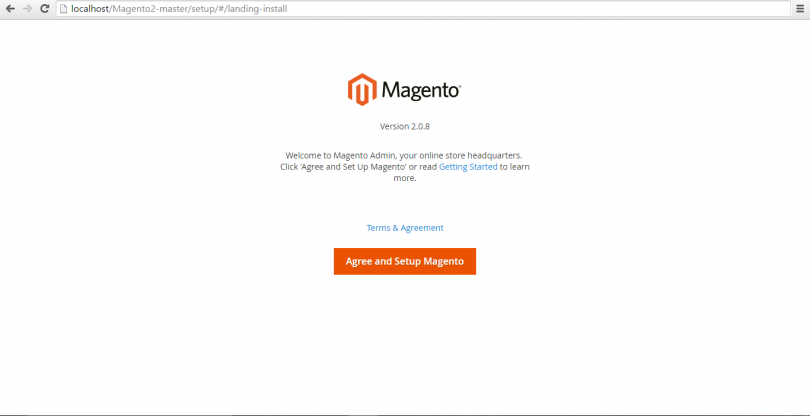
2. Create one folder and Unzip in and put it under C:\xampp\htdocs\FOLDER_NAME 3. Create a MySQL Database for Magento2 form phpmyadmin. 4. Go through the Magento installation process, below is the first screen
Click on button Agree and Setup Magento
Click to start Readiness Check button to move forword
If all the requirements are ok then it’ll show tick mark for that, click on Next button
Here add all the fields properly as mentioned, host, Database Username and password, database name, Table prefix, etc
and continue with the next button.
In this step it’ll ask for your store’s admin url.
5. After successful installation you will get this page 6. Your frontend will look like this
Installation of Magento 2 on Ubuntu 16.04 LTS – I am writing this article for absolute beginner with deeper explanation of all steps which are required to install and configure Magento 2.0 on Ubuntu OS. Let’s start: a) Install Apache2, PHP, MySQL Server, composer and required packages for Magento 2.0. Using command:
b) After successfully installation of these packages, make changes in the apache2.conf file and AllowOverrideall for Directory permission.
$ cd /etc/apache
$ Sudo nano apache2.conf
Changes from
Options Indexes FollowSymLinks AllowOverride none Require all granted
To
Options Indexes FollowSymLinks AllowOverride all Require all granted
c) Use ^x (Ctrl + X) to exit from edit file screen. After making change in Config file, you need to restart Apache. Use this command:
$ sudo systemctl restart apache2.service
d) Next step to install Magento 2 in var/www/html document using these commands:
cd /var/ww/html/
git clone https://github.com/magento/magento2.git
cd magento2
composer install
e) You might face problem while installing Composer in Magneto 2 directory, like some of PHP extensions are missing. Don’t be panic in this case and install missing extensions.
After installing all missing PHP extensions, change current directory to Magento 2 and install composer:
$ cd /var/www/html/magento2
$ composer install
f) Following messages come on screen: Loading composer repositories with package information Installing dependencies (including require-dev) from lock file
Login to Login here https://www.magentocommerce.com/ and use public key as Username and private key as Password.
g) Next step is to change directories permission to
$ sudo chmod -R 777 /var/www/html/magento2/
$ sudo chmod -R 777 /var/www/html/magento2/var/
$ sudo chmod -R 777 /var/www/html/magento2/pub/
Now we move to Mysql. To create Mysql database for magento 2 installation.
Use Following command: $ sudo mysql –u root -p Enter Sudo password and now you are ready to execute Sql queries using mysql prompt. Enter the following commands in the order to create a database instance named magento2 with user name magento2 h) Create database magento2; GRANT ALL ON magento.* TO magento2@localhost IDENTIFIED BY ‘magento2’; Database magento2 is created and all permissions are granted to magent2@localhost user with password magento2. To check you can use:
$ sudo mysql –u magento2 -p
Enter password magento2 and use sql query:
Mysql > show database;
Use exit to come out from mysql prompt.
Now you are ready for final step to install magento2.
Open http://localhost/magento2/setup/
If you face any permission issue, grant permission to Magento 2 root directory-
$ sudo chmod -R 777 /var/www/html/magento2/
When you get green check for file permission check, click next till installation finish. You can browse magento 2 using http://localhost/magento2/ or http://{ipaddress}/magento2/
At this stage, we are completed with Magento 2 installation on Ubuntu 16.04 LTS. Hope it helps you!
What’s the Difference between Zen Cart & Magento?- Zen Cart & Magento are both open source products but each comes with features that make it preferable over the other. It is only by looking at the features of each that you can make a decision on the best for your e-commerce platform.
This is a perfect platform for companies in search of a professional online appearance. It accommodates standard add-ons to enhance the experience of your users. Here are some of the features to expect.
Incredible flexibility when dealing with pricing and coupons
An impressively advanced filter function that allows you to achieve numerous categories
An admin function that allows you to add, remove and edit orders
This is the perfect option for beginners because of the coding aspect. It is preferred by shop owners who wish to handle coding on their own. The features to expect include
A comprehensive package of features to enable online sales
Perfect for beginner coding
Its footprints are light which increases accessibility on a shared environment
Very user friendly
An active development teams means that you get new and exciting products on regular basis
Magento vs Woocommerce: Know the Best E-commerce Platform- Magento and Woocommerce are the top ranked platforms in the market today. One is a singular product provided by ebay while the other is a WordPress plugin. Each has attracted a community of supporters based on its strengths and weaknesses. Entry into the ecommerce business requires careful consideration of the options. Given the two platforms, which should be your best bet?
Platform against Plugin:- What makes magento benefits pronounced is that it is a complete platform as opposed to woocommerce which is a WordPress plugin. It means that Magento comes with an advanced structure and functionality that will enhance the performance of your website. You have to install the woocommerce plugin on to a content management system (CMS) to ease utilization. However, the features offered by each vary and therefore provides unique opportunities.
Professional Requirements:- A sound and professional requirement is required when launching your website using the Magento platform. These skills might not be available at all times and you might be required to pay huge amounts to use it. Amateurs can use woocommerce since it does not require any web development skills. With a single click, you can install it on your website. There are no professional fees required or advanced skills.
Setting Up and Customization:- You will require sufficient background and skills to setup a Magento platform. These skills and expertise is not available to everyone. This means that it will be a limitation to some people. This is a factor that limits magento benefits for potential users. Woocommerce on the other hand taps into the structure and functionality of WordPress. It comes with an intuitive and interactive panel for the admin to simplify your work.
Exclusive Shopping Platform:- To enjoy Magento benefits, you must be visiting a shopping website. It is designed exclusively ecommerce purposes. This means that you will enjoy a range of features that are designed to improve your experience. Woocommerce on the other hand is a plugin and therefore not created exclusively for ecommerce websites. It means that the features available will limit the enjoyment of your shopping experience. The fact that it is exclusively designed for WordPress limits its capability on other platforms.
Why Magento Development is the Foremost Choice for Ecommerce Business
The decision to settle for Magento as your preferred ecommerce platform should be informed by attested benefits. The benefits Magento ecommerce given below are as a result of customer reviews and the experiences of developers using this platform. Magento will open a new chapter for your business by offering the following advantages over other products in a similar category.
Flexibility Magento allows you to create a perfect ecommerce store regardless of your sales target. You can design a site to sell as little as ten items or as much as ten million items. The type and size of your website will be accommodated by Magento. It even allows you to handle fluctuating traffic with the changing seasons of the year.
Open Source As a merchant, there are no cost implications when getting the Magento platform. Besides that, it comes with freely available extensions to allow you upgrade your site and improve on the shopping experience. There are no fees to be paid or licenses to be secured in order to use any of the excellent features. Open sourcing does not compromise your security, features or standards. It will make your website search friendly beyond improving customer experience.
Mobile Friendly With more businesses moving into peoples arms through the mobile phone, this feature stands out among the other benefits Magento ecommerce. The features are easy to view on smart phones which further enhance the experience.
Extensions Magento offers numerous extensions that are integrated to suit your ecommerce requirements. This is an opportunity to customize your website to meet the desires of your products and clientele. Some of these extensions are available for free while the others are affordable. Those that are sold offer excellent value for money.
Advanced SEO Advanced SEO ranks top among the most notable benefits of Magento ecommerce. It comes with excellent features to ensure that your products rank top on Yahoo, Google, Bing and other search engines. Top ranking will increase your traffic and improve your chances of raking in huge profits.
Simple yet Effective Though customization requires advanced skills, administering the system is very easy. The report and analysis modules are very easy to understand and operate. Making changes to the website is also simplified.
Grow Your Business With Our Expertise
We use cookies to ensure that we give you the best experience on our website. If you continue to use this site we will assume that you are happy with it.