Author: Sandeep Mishra

  • Document Scanning and Beyond: How is Artificial Intelligence Revolutionizing This Landscape?

    Document Scanning and Beyond: How is Artificial Intelligence Revolutionizing This Landscape?

    AI or Artificial Intelligence has taken the front seat in multiple domains and contributed immensely in leveraging productivity, accuracy, and outcome. The recent addition to the list is document scanning and management. The introduction of AI in document scanning has curbed tons of issues such as image blurring, missing out on certain information, and effective data handling.
    Needless to say, an e-signing facility that AI endowed businesses is a real game-changer as it took no time to make business-critical documents legally and professionally sound. If you haven’t explored the power of AI in document scanning and management then do it now while this blog guides you all through the journey.

    Document Scanning – A Necessity for Today’s Time

    Document scanning is the process of extracting paper-based information as it is in digital documents using digital scanners. The scanner is a machine functioning using OCR technology. OCR stands for Optical Character Recognition, which is useful in understanding recognizing the text, and converting it into digital data.
    Considering the huge data that today’s businesses have to deal with document scanning is the best bet to make while you seek reduced operational cost, enhanced productivity, and convalesced information access. Here are some of the reasons why businesses of all sorts and all industries must start scanning the documents.

    #Save huge operational cost

    When it comes to management and information retrieval, paper documents are a tough nut to crack. They are also highly demanding at the storage and consistency-maintenance front. They need huge space to be stored for future use. Cabinets, floor space, and a team of looking after them are the areas where one has to invest greatly in managing the paper documents.

    Once you scan the documents and turn them into digital form, all these hassles will be miles away. There is ample cloud storage offered at a very genuine price. You can covert the documents into multiple formats like images, presentations, and word files. They can be sorted and managed as per the categories and departments. All in all, scanned documents are easier to handle and manage.

    #Safety at its best

    Even if you manage to spend all the necessitated capital for managing paper-based documents, they are highly prone to get physically damaged and stealing. And if that happens, a business might lose assets worth a million.

    Scanned documents grant amazing mental peace at this front as well as digital documents can be password protected and access can be fully controlled.

    #Quick and easy information sharing

    Paper documents need to be couriered or posted to each at a different destination. This is a highly cost and time-consuming affair and the fear of misplacement of documents is always there. Scanned documents can be shared over a single click and will be received by the other party in the blink of an eye without compromising on security.

    #Environment friendly

    Lastly and more importantly, scanned documents don’t harm the environment.

    Document Scanning and AI – The ‘Made For Each Other’ Digital Duo

    Document scanning is already a game-changer, reaches the heights of perfection, and utilizes it while it combines with AI. While OCR technology reads the text on paper documents, AI interprets it intelligently.

    The information interpretation involves information prioritization, display of crucial data such as names mentioned in the document, dates, amounts, contact numbers, and emails, and sorting out information. AI is involved extensively in extracting data and sorting it as per the pre-defined criteria.

    The use of AI in document scanning has enabled multiple jobs such as:

    • Digitally signing the scanned PDFs or other documents using data-driven devices is possible.
    • Creating multiple formats of the same documents over a single click.
    • Automate the workflow from start to finish.
    • Doing all the post-scanning character recognition with zero human intervention.
    • Automatic data extraction and document clustering.
    • Reading the content, analyzing it, and sorting it accordingly.
    • Performing data analysis and predictive analysis is now a one-click job as scanned documents are compatible with data analysis software.

    Key Application of AI in Document Scanning

    An AI-empowered document scanning is going to do wonders at various fronts. Here are some of the most famed application areas of AI in document scanning jobs.

    Invoices and PFD Documents

    Enterprises and retail industries are benefitted extremely from AI and document scanning as they can manage a huge pile of invoices and documents over a single click. Manual work related to extracting information, sorting our customer information from invoices, and sorting the documents automatically is cut down significantly.

    #Bank Statements

    Banks are using AI in full swing as this technology allows them to scan the bank statements with utmost accuracy and share them with the customers over a single click. As these PDFs can be password protected, there is no question of compromised security. AI implementation allows banks to export the data/information to Excel or CSV files automatically.

    #HR forms and Payrolls

    AI-driven document scanning allows accurate information extraction for multiple HR forms and payroll purposes.

    #Sales & Purchase Order

    Extract information relevant for sales or purchase orders and export it directly to whichever system and device you want.

    #Price List

    The in-built AI and parser technology lets end-users extract product lists, tables, and other details from any paper-based document.

    Real-Time Examples of AI in Document Scanning

    Many tech giants such as Adobe and Google realized the power of AI and took no time to utilize it in document scanning. Here are some of the real-world examples of AI handling document scanning.

    Stack

    Stack comes from the trusted house of Google. Currently functional in US only, Slack is Google experimental Android app bringing AI and document scanning together. Using the app, end-users can scan documents and receipts as PDF and organize them automatically.

    The technology at work in this revolutionary app is Document AI. It combines AI and NLP for creating high-end and technology-infused models for documents. The technology has already helped process billions of pages for insurance, banking, loan, medical, lending, and other purposes.

    Adobe Scan

    We all are familiar with Adobe’s contribution in making human life effortless with its revolutionary technology and products. Adobe Scan is one more marvel created by this tech giant. It is an AI-empowered Text-recognition Software delivered with the Adobe Sensei suite.

    The tool uses AI to clean the target image before the scanning so that the final scan comes out as neat as possible. The use of AI in this sense makes text translation quick and accurate.

    The AI used is so powerful that if you’re scanning folded documents then it will try to keep the impact of the fold as much as possible and capture a precise scanned image.

    AI also integrates the PDFs with Adobe Document Cloud and simplifies the entire storage hassle. The scanned documents will be automatically uploaded on the cloud saving a huge deal of time and effort.

    Future of AI in Document Scanning

    Seeing the commendable difference AI is making in document scanning, it’s easier to conclude that its penetration will become only stronger with time.

    The future of AI in document scanning comes with endless possibilities out of which the key ones are scanners with face recognition, online chat support while scanning, AI scanning the dialogues, and a dedicated PA to read the scanned text. This is one of much forward-thinking technology that humans can utilize to strengthen the document management job. If you haven’t given it a try, try it today as it’s worth a try.

  • 10 Tools to Improve WFH Productivity for IT Professionals

    10 Tools to Improve WFH Productivity for IT Professionals

    WFH or Work from Home is the new normal and all thanks go to the outbreak of the COVID-19 pandemic. All of a sudden, it put a halt on the ever-moving world and forced us to stay indoors. While it was for our own good, it has some negative sides as well. For instance: enterprises and businesses of all sorts having a tough to maintain the before WFH productivity.

    For working professionals, it was daunting and tedious than before as they have to maintain the pace with limited resources. As we all going to work from home for a little longer, it’s high time to figure out a solution. With limited productivity and tedious working hours, no one is going to thrive for long.

    Here is a list of top 10 tools that are helping developers, designers, and many other IT professionals to perform par excellently without draining out themselves.

    Tools for Team Communication

    Work from home means working without your equipped team by your side. Here are tools to consider that make sure that your teammates are only out of sight, not out of mind.

    #1- Slack

    It’s hard to beat Slack when it comes to team communication and collaboration. As it was built by remote workers itself, it has addressed the challenges of remote communication very well. Cumbersome email exchanges, arranging meetings, information exchange, instant messaging, video calling, and many other kinds of communication has been simplified a lot with this tool. Honestly speaking, it’s the need of the hour for everyone, not by IT professionals.

    #2- Spark

    One of the most loved email productivity tools, Spark makes e-communication effortless. You are allowed to snooze emails, send smart emails, and send reminders for others. It has made email communication easy and professionals. Emails can be customized as per the need of the hour. In fact, one can put access restrictions on email to make sure no unauthorized professional is reading

    #3- Zoom

    Zoom doesn’t need any introduction. After almost two years of work from home, everyone is familiar with this app. It’s a cloud-based video conferencing tool simplifying group messaging and simple online meetings. At a time, more than 100 interactive participants and 10,000 view-only attendees can be a part of a meeting which makes it stand out from others.

    Tools for Better Focus

    The main hurdle that IT developers and designers are facing, while working from home, is the lack of concentration and focus. Because of this, they end up spending 3-4hours on a jib which can be done within an hour or so. With school closed and kids around, it’s impossible to have focus. Gladly, below mentioned tools are here to help.

    #4- Serene

    With features like block distractions, power sessions, day planner, to-do list, focus muscle, phone silencer, and focus music, Serene ensures that you are focused and can have unwavering concentration. There is a free trial offered for 14 days. After that, only $4 per month need to spend to attain full focus. It’s all worth it.

    #5- Forest

    The phone is the biggest distraction and Forest ensures that you don’t overuse it while working. We tend to check WhatsApp and Instagram during work hours and don’t realize that already an hour is passed by. With Forest, this isn’t going to happen.

    Tools for Time Management

    Juggling between household chores and office deadlines is tough and takes a toll on one’s mental peace. Have a look at the below-mentioned tools below that can save you from this hassle.

    #6- RescueTime

    As the name suggests, this tool is here to save time. It’s been around since 2007 but never was not loved as it is now. WFH model has made this tool popular. It’s a very powerful time tracking and distraction blocking software working perfectly fine on platforms like Mac, Windows, Chrome, iOS, and Android devices.

    #7- Focus@Will

    Supported by world-famed neuroscientists, this app is here to help in creating sustainable work from the home scenario with less focus on useless things. The in-built timer and tracker make time tracking possible. There are multiple focus modes to better time utility.

    Tools for Better Productivity

    For developers and designers, working from home is tedious as resources are limited. They can’t access the advanced technology just like they used in the office. Still, some tools are going to improve productivity.

    #8- Proto.io

    Unleash your productivity in full capacity with Proto.io as this tool offers a wide range of the instrument to convert hand-drawn style into digital format. This is for designers especially. It comes with an in-built sketch and Photoshop mode to utilize different instruments. The final configuration can be measured as well with its help.

    #9- Process Street

    Founded in 2014, this one is going to help in reducing the repetitiveness involved in business tasks and checklists. Track business project processes, reducing mistakes, and designing scalable solutions are possible with the help of this tool.

    The best part of using this app is that the navigation can be done through keyboard shortcuts. One is allowed to ass images, videos, and any other document in the project whenever and wherever needed. There is a 14-day free trial offered. After then, three subscription choices are there.

    #10- Asana

    Don’t get too involved in project management. Use Asana and enjoy effortless project management. It offers a wide range of features and facilities for jobs like task management, calendar, time tracking, data sharing, and online collaboration. Up to 15 people can collaborate effortlessly with the help of this tool. The wide range of integration ensures that tasks are done quickly and effortlessly. Multiple paid versions are offered for effortless. It’s worth the try.

    The Final Say

    Work from home is going to stay here and going to give hard time. To make sure you don’t lose your sanity during the process, use the above-mentioned tools. From focus to time utility, these tools are going to help at every front. Thousands of professionals have already taken their help. When are you trying them out?

  • Which .NET platform suits your project best?

    Which .NET platform suits your project best?

    Understanding the difference between .NET Core, .NET Framework and Xamarin

    For quite some time now, coders have been flooded with various unique innovations, making it complicated for them to choose the right platforms for developing projects. Today, their focus is not only on developing IT solutions that achieve the pre-decided functionality, but also on ensuring that the solution doesn’t get outdated soon, is compatible on multiple platforms and is easy to build, with the necessary pre-built libraries and widgets making the work faster.

    Technologies like .NET Core, .NET Framework, and Xamarin have changed the face of application development and made it easier for developers to adapt to different screens like laptops, tablets and mobile phones. Even though all three of them might seem overlapping, each one is considerably different from the other.

    Prima facie, the main distinction between the three is simple. The .NET Framework is the traditionally used platform for building .NET applications on Windows. The .NET Core is a cross-platform which is used to develop consoles and web-apps that can run on any platform – Windows, Linux or Mac. Xamarin is an open-source Mono-based cross-platform used for building mobile apps that are compatible with iOS, Android and Windows phones.

    .NET Framework

    The .NET Framework proves to be highly beneficial in providing services such as memory management, type safety, networking, application deployment, security and data structures. It is recommended to use .NET Framework if the existing application already operates on it and you are looking to extend its functionality, or if you want access to third-party libraries.

    Applications of .NET Framework are written in C#, F# or Visual Basic and compiled to Common Intermediate Language (CIL). The main components of .NET Framework include Common Language Runtime (CLR) and .NET Framework Class Library. Since the CLR runs .NET applications on a given machine, it converts the CIL to machine code. Along with this, the .NET Framework Class Library provides language interoperability among supported languages.

    .NET Core

    .NET Core is a high-performing, open-source cross-platform for building websites, services and console apps on Windows, Linux and Mac. Its performance with regard to mapping is better as compared to .NET Framework, as well as it has the ability to self-host or host on Docker, IIS, Apache or Nginx and requires only a single NuGet package.

    .NET Core definitely has its own advantages. It can be used for server applications when:

    • You are targeting microservices.
    • You are using Docker containers.
    • You need scalable systems.
    • You want to use several versions of .NET in the same project.

    .NET Core has been designed to cater to a modular approach and it is fast and lightweight.

    Xamarin

    Xamarin is a .NET implementation for running applications on all the major mobile operating systems, including iOS and Android. It uses Mono as the .NET implementation for running the apps, and projects can be created from Visual Studio or Visual Studio for Mac. In the age where apps run on iOS and Android, Xamarin promises to create the best User Interface. In fact, Microsoft claims that Xamarin is the finest way to optimize performance in apps on multiple platforms. It is the best choice for developing native mobile apps with the best UI performance.

    Xamarin brings some exciting features to the .NET ecosystem such as base framework for accessing native features, platform-specific libraries, and Extensible Markup Language (known as XAML) for building dynamic mobile apps using C#. In order to build any mobile app using C#, Xamarin is the only available choice for developers.

    All the three platforms provide unique options for building various desktop, mobile, cloud, gaming and IoT applications within the .NET Ecosystem, as they share many underlying technologies. Moving ahead, Microsoft is heavily investing in .NET Forward to open up more avenues for developers on these platforms. Each of these software-building technologies has varying characteristics and implementations which gives each their distinct characteristics. But it becomes necessary for developers to compare them and gain sufficient knowledge about them, so that they can choose what’s best according to their requirements.

    If you are looking to develop an idea and want to explore your options, connect with us at support@stw-services.com and we can help you choose the best platform to build optimized solutions.

  • Ingenious Solutions by STW Services Makes them Rank as Top Mobile App Development Company at GoodFirms

    Ingenious Solutions by STW Services Makes them Rank as Top Mobile App Development Company at GoodFirms

  • Blazor – Best Framework for application development

    Blazor – Best Framework for application development

    On the front-end, businesses turning towards digitalization are focused on one particular thing, to simplify the user experience and making any solution as user-friendly as possible. At the back-end of this, it meant developers creating strenuous codes and javascript programs to provide easier functionalities. In recent times, however, different platforms are making this easier for developers to create better solutions with in-built components, easier languages and responsive libraries. One such framework that is showing promising results is Blazor, from Microsoft.

    Blazor is still fairly new in the world of front-end development, but can be used to develop various client-side web UIs using an assortment of C#, HTML and CSS instead of JavaScript, a feat which has been happily welcomed by developers. This free, open-source web framework makes use of the latest web standards and can build highly interactive web apps, without need of any additional plugins or add-ons to run. It uses the existing HTML Document Object Model (DOM) in CSS Styling to process UI components, but can also be shared across different platforms as it uses C# for processing.

    There are two different methods followed today, to develop Blazor applications. The client-side Blazor, which runs directly on the browser, makes use of Web Assembly to run the code, while the server-side Blazor runs the same code, but on a server.

    • Blazor Web Assembly:

    When building applications using Blazor Web Assembly, the Blazor code can be run inside of the .NET runtime, on top of Web Assembly (Wasm), so that the compiled code is directly running in the browser, acting as the host for the applications. This also enables to run the applications offline, as well as create low latency applications, due to its near-native runtime speed. As Wasm is compatible with all major browsers, Blazor can be run on all major browsers, including web browsers.

    • Server-side Blazor:

    In the server-side model, the Blazor application is run on top of .NET coretime, with a real-time two-way SignalR connection with the server. The application can surprisingly handle more than 20000 active users concurrently, without any glitch in the performance. The only condition which is required in this case is that the application requires a constant connection to the server.

    These types of Blazor applications do come with their own set of challenges, but one can be reminded that the framework is in its very nascent stage and undergoing constant development. However, it does provide with many pros which are helping users to experiment with developing web and mobile apps.

    Features of Blazor:

    • For Client-side Blazor:
      • Compiles and runs .NET code directly in the browser in C#.
      • Its compiled nature enables it to run faster than a similar logic from Javascript.
      • As it does not pass each action through the server, it enables user to run the app offline.
      • Both the client side and the server side can be applied with the same validation code.

    • For Server-side Blazor:
      • It is completely compatible with every .NET library and .NET tooling, as it is it is essentially a ASP.NET core application.
      • Uses the exact same syntax as client-side Blazor, which allows developers to write a class library in either of the two Blazor modes.
      • It is interoperable with Javascript APIs and libraries, so that a developer can continue using them, while writing the logic in C#.

    Having two distinct types of Blazor modes, one can choose the right fit for any project based on the nature of the project. Each one has its own pros and cons, but the platform provides the needed flexibility to create applications as desired.

    The future of Blazor seems bright, and soon, it might become a single UI Framework for creating any .NET application. This open-source framework has been a dream for many new-age developers, who do not want to learn the javascript to be able to create applications. C# is evolving every day and adapting to the capabilities shown by other languages. Thanks to platforms like Blazor, it is gaining huge popularity.

    In the days to come, Blazor will undergo its own fine-tunings but has already shown a lot of promise. Though it is not meant to completely replace JavaScript, the introduction of Blazor has enabled C# and .NET to expect a very exciting road ahead.

    If you want to learn more about how Blazor can help you with your new idea, you can connect with us at support@stw-services.com.

  • STW Services LLP Recognizes Our Employees’ Dedicated Efforts

    Recognizes Our Employees’ Dedicated Efforts:-

    Small businesses benefit their local communities in many ways. They promote and cultivate innovation as well as instill unique identity by adding diverse characteristics. 

    Another big way that small businesses help their local markets is by encouraging healthy competition that invigorates the economy. Not to mention, small businesses also provide and create jobs for their local communities.

    Small businesses do this and so much more! It’s clear that they make a big impact and help in many ways that often go unseen. That’s why at this time now more than ever, it’s vital that economic players of all sizes support and encourage small businesses.

    And that’s why our leadership team here at STW Services LLP would like to take this special opportunity to highlight our continuous appreciation for our team members! We value all of their hard work and the devotion they have toward helping us achieve our goals.

    Since 2011, we’ve provided services ranging from website development, to SEO, to marketing to HR. We’re truly the one-stop-shop for all your IT needs. It’s our mission to help you connect with the right technology for your business.

    Our wonderful employees are grounded in our core values of quality, punctuality, and adaptability. We’ve completed over 1,000 projects in over 35 countries. In an ongoing project, we’re providing software development support for a software solutions provider.

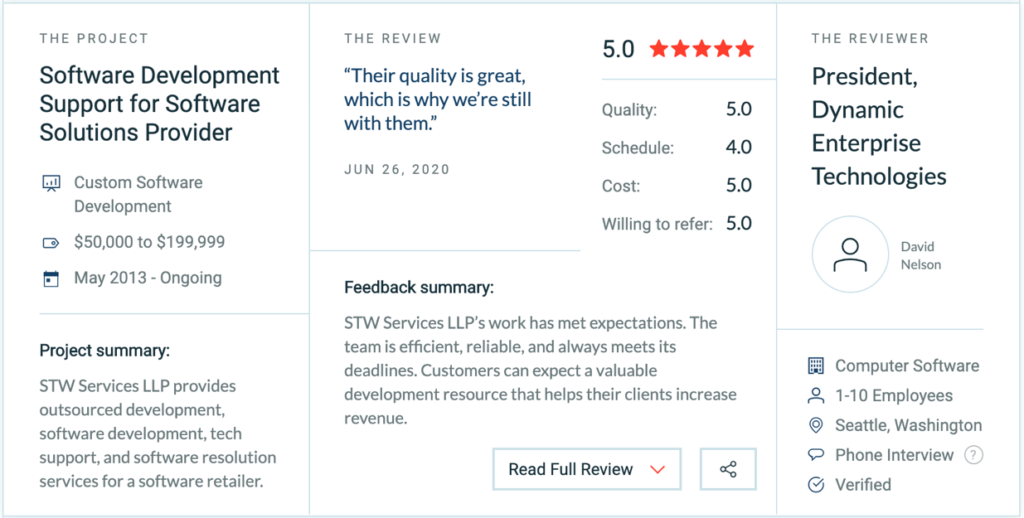
    In this engagement, our team handles work in web development, software development, technical support, and software issue resolution. David Nelson, the president of the company kindly took the time to leave us a review.

    He said, “They hit deadlines well and it’s nice that they provide a wide array of skills to help our customers.” He continued, “They’re reliable and there when I need help.” We’re extremely grateful to David and to all of our clients who have left reviews.

    Reviews and our presence on The Manifest, a platform that helps companies stand out, helps us recognize our employees’ hard work and contributions. We’re always thrilled to celebrate the success and victories of our team members.

    Please join us in giving our small but mighty team of rockstars a big thank you!

    If you’d like to discuss your next project with us, feel free to contact us today!

  • Flutter: The future of hybrid mobile development

    Flutter: The future of hybrid mobile development

    Mobile app and web development is one of the most challenging tasks today. With the competition to represent almost every company on the digital front constantly increasing, be it a mobile application or web platforms, developers today are expected to work smarter and more efficiently to develop ideas. With the need of developing mobile apps on both, Android and iOS, the future of mobile apps is without a doubt, turning towards hybrid development.

    One of the additions to the hybrid app development scene, since 2015, is Flutter – a powerful UI Toolkit created by Google, for building native applications for mobile and web, from a single codebase. Flutter is an open source framework, providing a simple and powerful SDK to write applications in Dart, a language created by Google. Over a short period of time, it has been widely accepted in the industry as a strong, reliable platform, thanks to some of its unique features and efficiency.

    One of the biggest strengths of the platform is the hot reload feature, which helps developers to build UIs, fix bugs, add features and explore possibilities on physical or virtual screens, in the debug mode, by simply injecting the changes in the Dart Virtual Machine (VM) mode.  Flutter then automatically rebuilds the widget tree, while preserving the original state of the app. Thus, the developer can view the effects of the most recent changes in real-time, without eliminating the current state.The advantages which Flutter promises over the other platforms are not only a more streamlined approach in mobile app development, but an overall enhanced experience for both, the developers, as well as the end-users.


    The advantages which Flutter promises over the other platforms are not only a more streamlined approach in mobile app development, but an overall enhanced experience for both, the developers, as well as the end-users.

    • A single code-base for both Android and iOS applications needs to be written. This also means faster performance, lesser testing time and more efficient maintenance.
    • Easy-to-use and great developer tools, with amazing customization capabilities.
    • Dart language is simple to learn and comes with a large repository of packages to help extend application capabilities.
    • Flutter boasts of a huge catalog of ready-to-use Material Design and Cupertino widgets, along with complete control over the layout. Flutter widgets support hand gestures and animations, for a better app features.
    • Beautiful user interfaces for a smooth experience for end-users.

    In a competitive market, which is flooded with competition, Flutter has made a name for itself as one of the most promising app development platforms. Through its simplistic development process and higher performance, Flutter gives developers complete freedom to build mobile applications in a way, which is truly platform-independent. The framework has been widely accepted by the mobile application market and is being used by even larger players and renowned tech-companies.

    What remains to see in the near future is the capabilities which mobile app developers can bring out through Flutter, to create magic on mobile screens.

  • How to create Power BI embed token to host reports in Web Application

    How to create Power BI embed token to host reports in Web Application

    In area of data visualization Microsoft Power BI is leading. Using this blog we are going to learn how to generate Embed token to host Power BI reports in any web application. Sometimes it will take hours to figure out how to embed token. Use these steps to do it in hour.

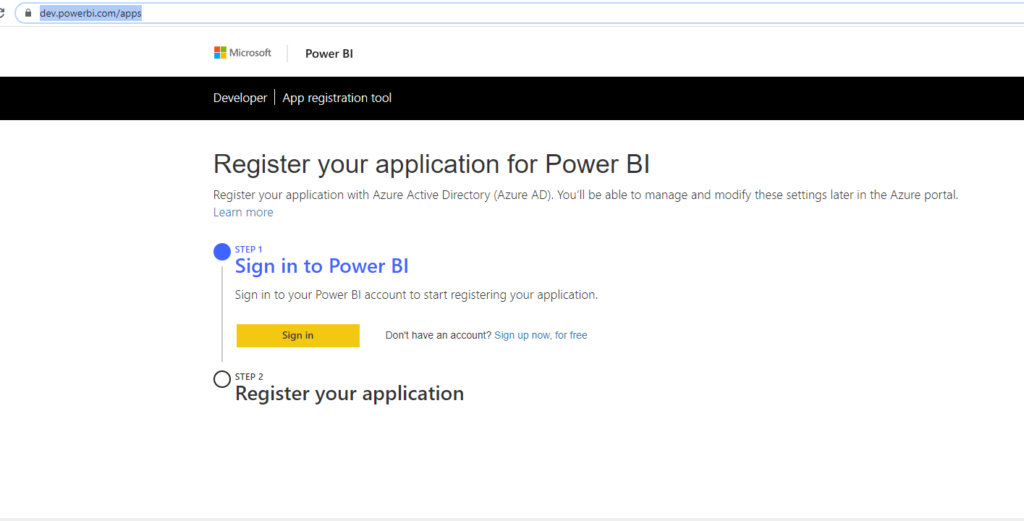
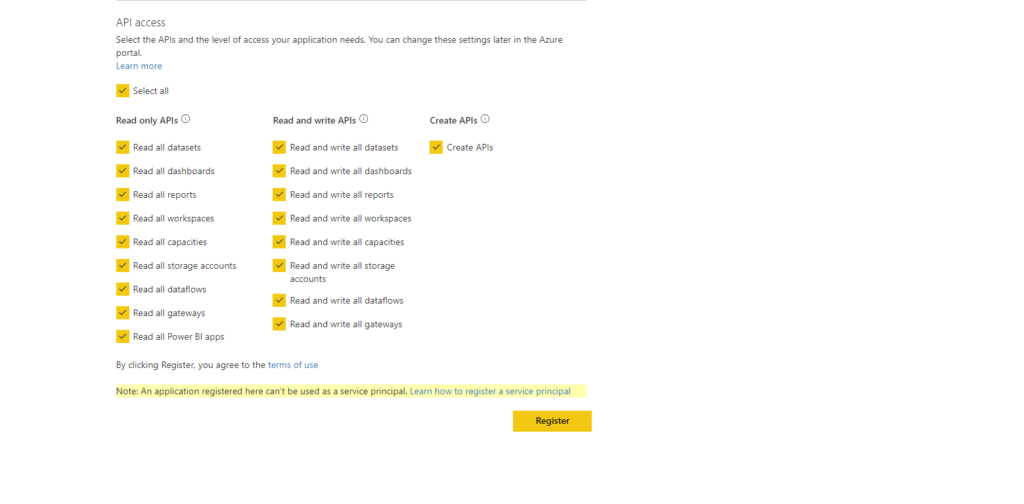
    To embed Power BI report, it must be authorized by Azure AD. In regard of that we have to create Azure Ad application and give right permission. In case of Power BI Microsoft created a simple flow to register app and get Client ID and Client Secret code. Use this https://dev.powerbi.com/apps  to register application in Azure.  Similar screen will come to register application. For example I register DemoPowerBIApp.

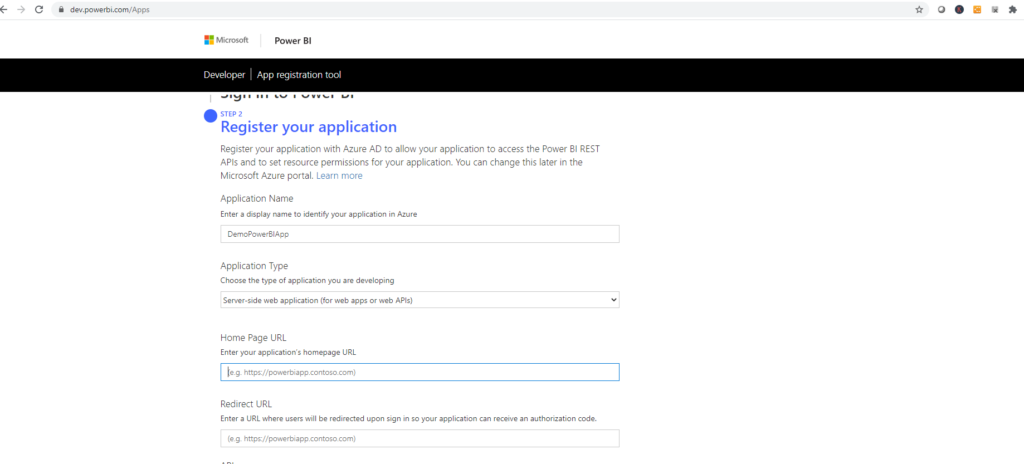
    Select Application type as server side web application.  And add redirect URL.

    In permission part select all –

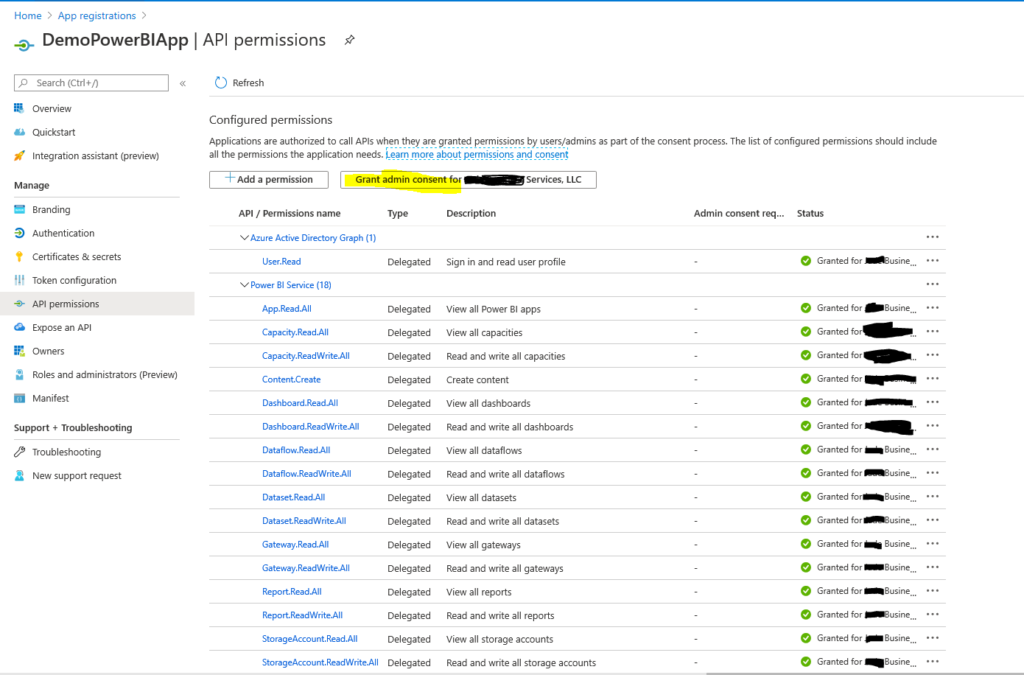
    Next step to assign right permission to created AD application. For that login to your Azure portal and go to Azure Active Directory and select created app in my case I selected “DemoPowerBIApp”. Select API permission and click on Grand Admin consent for application. For reference use this image.

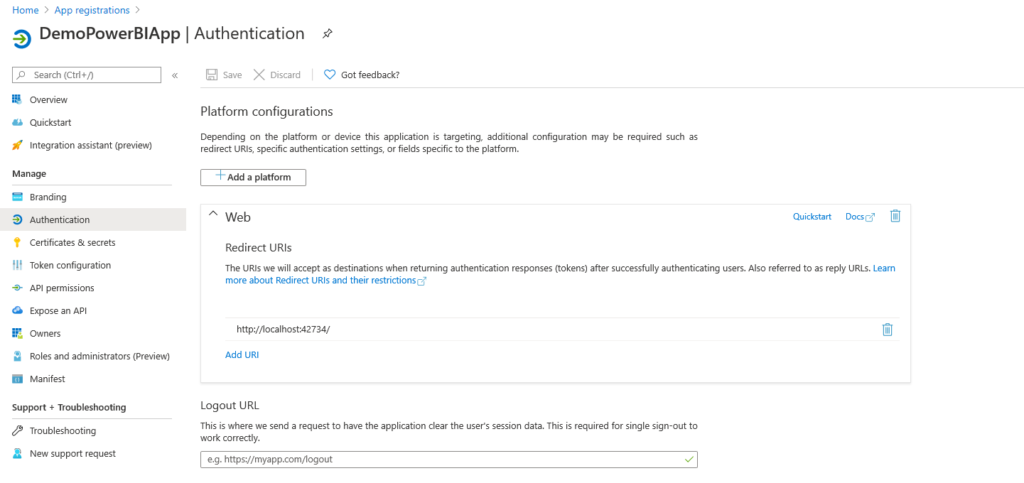
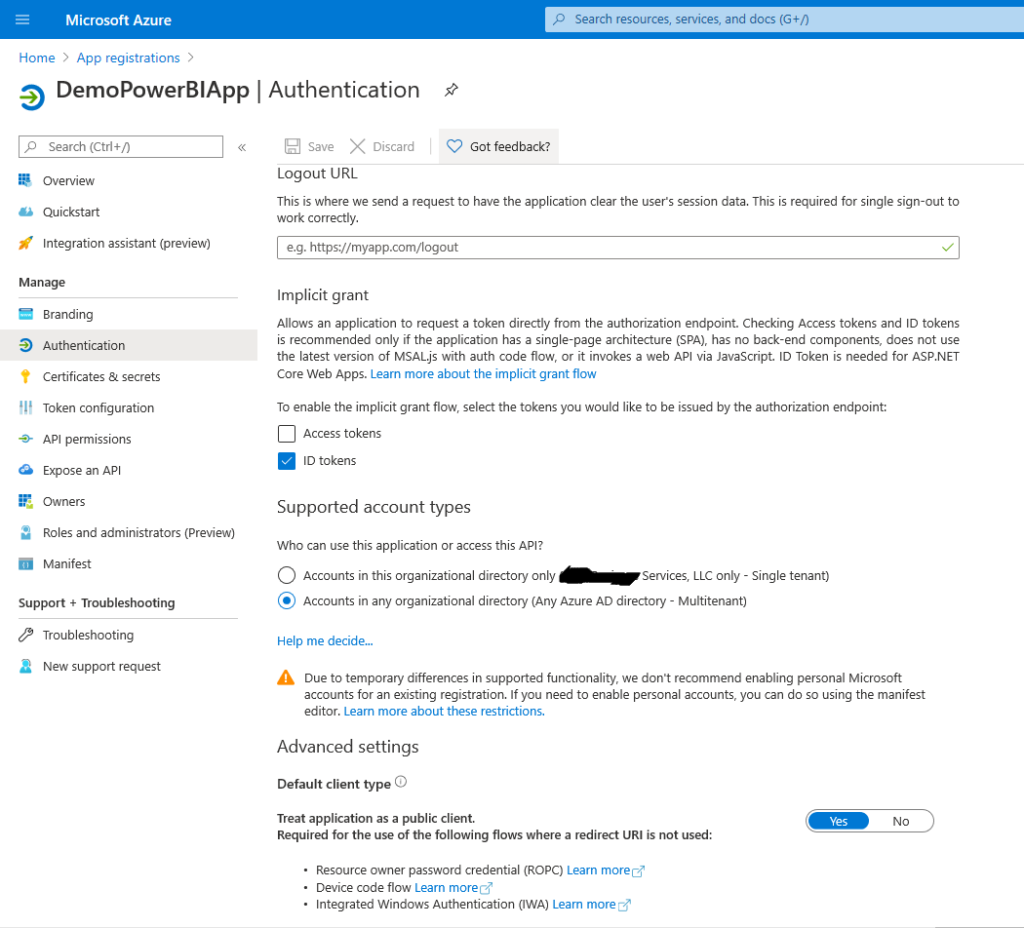
    Select Authentication left Navigation and add redirect URL. This setting is quite important to authorize your client domain to Azure token API. Add platform select web and add redirect URL. In our case it will be already added as we created app using above URL.

    Also allow Default client Type to yes and save.

    Next to use STW source code in our git report to get token – https://github.com/stw-services/PowerBIembedTokenSourceCode .

    For test application you can use this URL – https://opensource.microsoft.com/ .

    For any Power BI consultant connect us on info@softechworld.com.

    Thanks,

    Happy Programming!!

  • Why is Java Script considered as the future?

    Why is Java Script considered as the future?

    Java Script is a light weight, object-oriented programming language with top built-in functions and is best known as a scripting language for webpages. But, it is also used in many non-browsing environments as well.

    Java Script is ruling the digital world today. Web pages, mobile apps, cloud services, IOT Devices – they all rely more and more on Java Script. The importance of Java Script as a web technology can be determined from the fact that it is currently used in 94.5% of all websites present on the internet. This explains a lot, right? Understanding and learning Java Script is vitally important for everyone related to the IT hub.

    Let’s explore some reasons for the tremendous popularity and success of Java Script –

    • Platform Independence

    Java Script is a universal language. Having the entire codebase on this language comes with its own benefits. You can reuse a lot of code. You can use the same packages for all your projects, same package manager, task runner, module bundler, libraries and all the other tools and services you can think of. There’s no need to re-write the same code each time on a new platform.

    • Implement Client-Side Scripts

    Initially designed as a client-side scripting language, a large percentage of websites still use Java script for the same. Developers can easily write custom client-side scripts in Java Script and seamlessly integrate these scripts into HTML.

    • Enables Server-Side Code Writing

    Web Developers can also write server-side code in Java Script using a cross platform runtime engine like Node.js. Node.js executes the Java Script codes efficiently and smoothly without relying on external web sources owing to the built-in libraries it provides. Hence web developers can use Node.js to write both Client-Side and Server-Side code in Java Script.

    • Simplifying Complex Application Design

    Despite being an interpreted programming language, complex web application development can be simplified by Java Script by allowing developers to simplify the application composition. Programmers can use Java Script libraries to create shadow DOM (Document Object Module) boundaries, which simplifies the application’s structure and dissever components of individual Java Script libraries.

    • Numerous Transpilers

    Java Script is a light-weight programming language. It lacks some of the advanced and robust features provided by modern programming languages like Java and C#. But developers can easily extend Java Script by using various transpilers like CoffeeScript, TypeScript, DukeScript etc. Each transpiler enables the developer to meet the requirements of large and heavy applications.  

    • Responsive Web Designs

    Developers nowadays adopt responsive web design to make a website accessible and attractive across multiple browsers and devices. Responsive Web Design enables the developer to optimize a website for both computers and mobile devices using the same codebase.

    • Fully-Featured Libraries and Frameworks

    The web developers can easily extend the functionality of Java Script by using numerous libraries and frameworks. Libraries like Angular JS and Ember enables the developers to add functionality to complex web applications without having the need to write additional code.

    • Consistent Evolution

    As mentioned earlier, Java Script lacks some advanced features provided by modern programming languages like multithreading and file read/write option. But the programming language has been evolving consistently to meet the emerging trends of web application development.

    Java Script has proved to stand out of the many strong and powerful languages, and is turning out to be the universal language for developers. It’s potential for the future is enormous as its functionality tends to ease the work of programmers. You can’t avoid it, so why not master it.