Introduction:
When most businesses talk about “adding AI,” they imagine it as a magic switch, plug it in, and suddenly every process runs itself. But the reality is very different. Just like hiring a new employee, an AI model comes with general intelligence but no knowledge of your business until you train it, give it access to tools, and guide it with clear workflows. That’s where the concept of multi-agent architecture comes in.
Instead of relying on one giant AI to do everything, you build a team of digital employees, specialized agents, each with a clear role, connected together under an orchestrator. These agents can think (LLMs), remember (RAG), act (Tools/APIs), and know when to work (Triggers). Together, they mirror the way real organizations operate, collaborating, checking each other’s work, and scaling as your business grows. This approach turns AI from a “nice-to-have chatbot” into a true digital workforce that supports every department.
Multi-Agent Architecture
When you think about building AI systems, the word multi-agent architecture can sound intimidating. But here’s a simple way to picture it: imagine running a company.
In a company, you don’t hire one person and expect them to do everything marketing, sales, HR, accounts, customer service. That would be chaos (and probably burn them out!). Instead, you hire specialists, train them, give them the right tools, and put managers in place to coordinate work.
Organizational Org Chart.
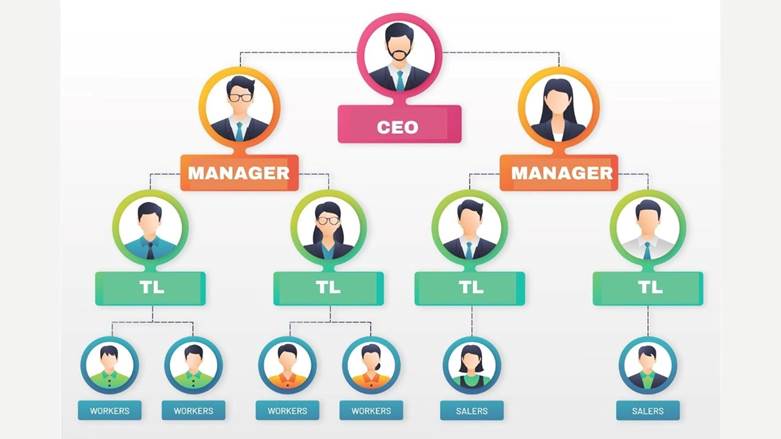
In Multi-Agent Orchestration, you can think of every employee in your company having their own digital counterpart (an AI agent) that mirrors their role, responsibilities, and workflows.
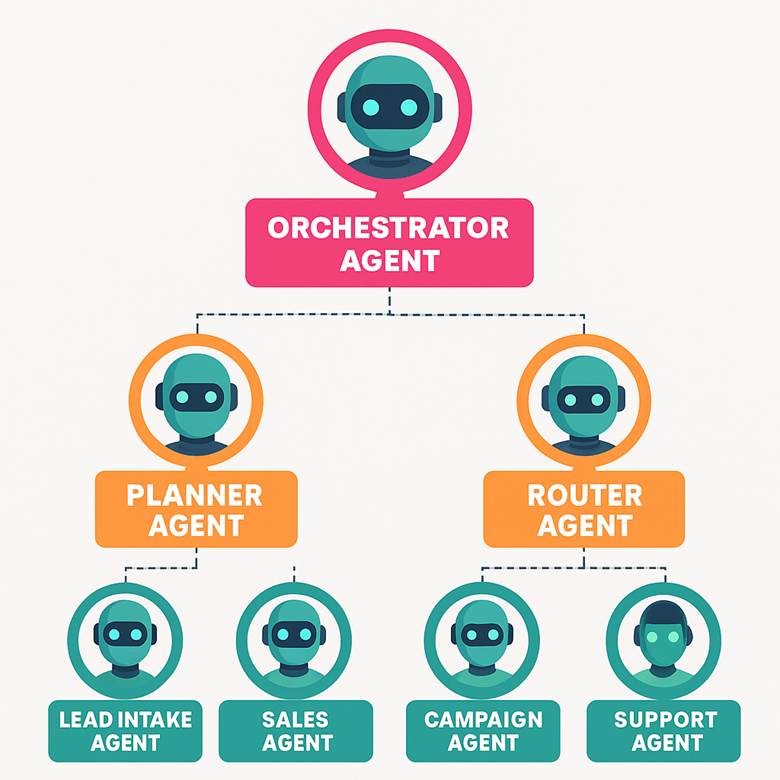
How these things you can organize in Copilot Studio to create your agents, let’s understand technical things in normal language.
Outcome in AI agents based on:
Outcome = LLM (brain) + Context (RAG) + Tools/Actions (APIs) + Workflow (agents) + Feedback loop
Generative AI / LLM (Generative AI orchestration in Copilot Studio):
LLMs are great generalists. They’ve learned language, patterns, reasoning tricks. but by default, they:
- don’t know your latest prices, processes, or edge cases,
- can’t hit your systems (Odoo, D365, WhatsApp, SharePoint) without tools, and
- aren’t trained to follow your policies (discount limits, legal phrases, PII rules).
so, if you ask them for company-specific answers without context, they hallucinate, politely and confidently.
Context (RAG):
RAG = Retrieval + Generation
- Retrieval: AI fetches relevant pieces of information (like SOPs, price lists, or FAQs) from your enterprise data store.
- Generation: AI uses that retrieved info to create an answer.
Think of it like this:
A human employee doesn’t memorize the entire company handbook. Instead, they look up the page they need when answering a customer.
Tools/Actions (APIs):
Tools like adding skill to your AI agent to perform things. For you are giving employee accounting software to perform account work. Think of a human employee.
- Their brain = reasoning and language (like an LLM).
- Their hand/keyboard = the ability to act (send an email, update CRM, generate a report).
LLMs on their own are just the “brain.” They can think and talk, but they can’t actually do anything in your business systems.
That’s why we give them Tools.
And in practice, Tools = APIs, scripts, or connectors the AI can call.
Triggers
In the context of AI agents (or automation in general), a Trigger is the event that starts the process. For example, you are assigning work to employees and asking them to start on Monday. So scheduled task to him to perform on fix time or event.
Think of it like this:
- In a company, a trigger could be: “Customer walks into the office,” or “A support ticket is filed.”
- For AI agents, a trigger is: “WhatsApp message received,” “New lead created in CRM,” or “Invoice overdue by 7 days.”
No trigger → no action.
By combining LLMs as the brain, RAG as the memory, Tools (APIs) as the hands, and Triggers as the starting point, you can create a true digital employee—an AI agent that doesn’t just talk but can actually understand, decide, and act. These agents can then be connected with each other in a multi-layered architecture, where each one has a specific role—like sales, support, or compliance—while an orchestrator coordinates their work. Just like in a real company, they collaborate, pass tasks along, and validate each other’s outputs. This interconnected system of digital employees is what we call a multi-agent architecture: not one giant AI doing everything, but a structured team of specialized agents working together to achieve enterprise goals.
Conclusion
Multi-agent architecture isn’t just a buzzword, it’s the future of how businesses will work with AI. Instead of expecting a single model to do everything (and getting frustrated when it doesn’t), we should think of AI the same way we think of people in an organization: each role has a purpose, each employee has tools, and they all work together under clear processes. By giving AI agents a brain (LLMs), memory (RAG), hands (APIs/Tools), and a clock (Triggers), we transform them into digital employees who can handle real business tasks with accuracy and accountability. And when these agents are connected in layers, coordinated, specialized, and scalable, you don’t just have automation, you have a digital workforce ready to grow with your business. The companies that succeed with AI won’t be the ones that add a chatbot and hope for the best, but the ones that build a well-structured team of agents that mirrors their organization and delivers results every single day.