Introduction:
In the world of business-critical ERP systems, disaster recovery (DR) is not optional. it’s a necessity. Microsoft Dynamics 365 Business Central SaaS provides robust built-in backup capabilities that allow administrators to recover environments within a 28-day window. This blog explains how Microsoft handles these backups and how you can restore your environment if things go wrong.
Microsoft’s Built-In Backup and Restore Features
Microsoft automatically backs up all Business Central online environments (Production and Sandbox) daily, with retention of 28 days.
Key Features:
- Automated Daily Backups (no manual action required)
- Restore to any point in time within 28 days
- 1-minute precision for restores
- Available via the Admin Center
- Geo-redundancy for added disaster resilience
🧭 How to Restore a Business Central Environment
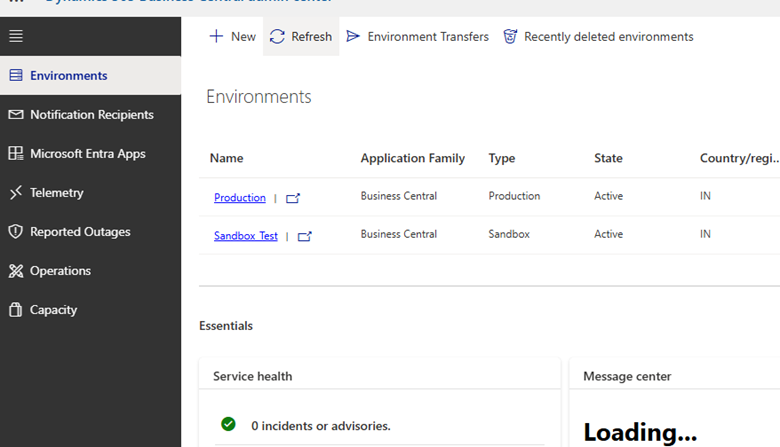
Navigate to Admin Center:
URL: https://businesscentral.dynamics.com/{tenantId}/admin
Select the Environment you want to restore (typically “Production”)
Click Restore and choose the desired date and time from the last 28 days
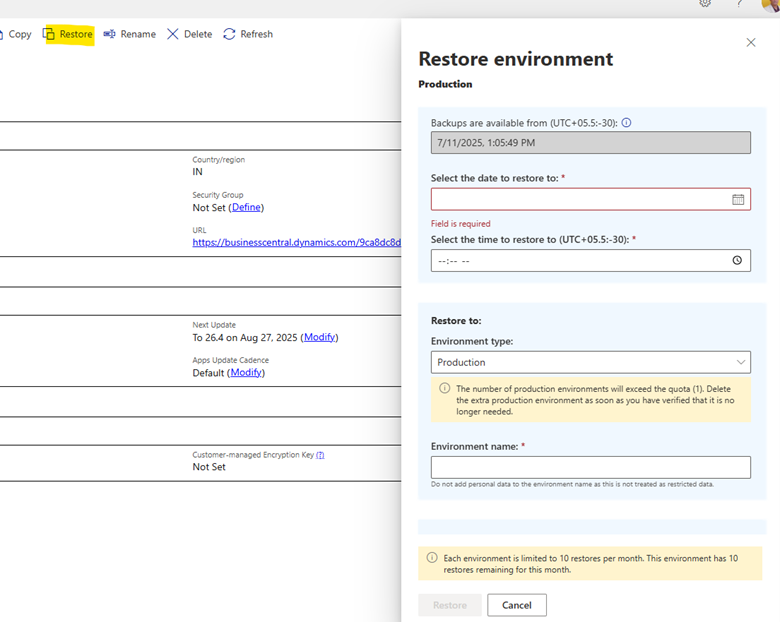
Give your new environment a unique name (you can’t overwrite the current one)
The restored environment will be created as a Sandbox.
🛠️ What’s Included in the Backup?
| Included | Not Included |
| Tenant database | Attachments stored in Azure Blob |
| Configuration and app data | App source code or extensions |
| Point-in-time data | Any data past 28 days |
When to Use This:
- Accidental deletion of records
- Data corruption or integration errors
- Testing rollback after major changes
- User error affecting production data
Limitations
- No manual export of full backup
- Backup cannot be downloaded
- Restore cannot overwrite production — only create new sandbox
- Retention capped at 28 days
Best Practice
Always monitor critical operations and note significant data changes so that, if needed, you can restore precisely to just before the issue occurred.
Conclusion:
Microsoft’s built-in disaster recovery features for Business Central SaaS provide a strong first layer of protection. The 28-day rolling backup and self-service restore make it easy to recover quickly from most common issues without extra configuration. For long-term backup or regulatory requirements, however, you’ll need to extend this capability, and that’s what we cover in the next blog.